
How to create your 3D book cover

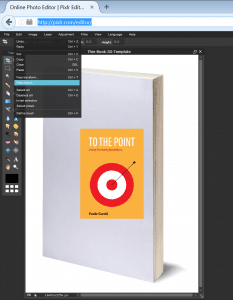
Here is a step-by-step on how I created a 3D book cover for my eBook.

  1. Find a blank book cover template (Google Images or your preferred site)
  2. Open pixlr.com/editor/  , a free online image editor
  3. Open image from computer, then open the blank book cover template
  4. Layer / Open image as layer (open your flat eBook cover image)
  5. Edit / Free distort (distort the blat eBook image to fit the 3D book template
  6. Save as jpeg
creating-3d-book-image

image on pixlr.com

eBook on Lean Inception and Lean MVP

before

tothepoint-book-cover-3d-small

after

Paulo Caroli

Paulo Caroli is an author, speaker, and consultant specializing in agile transformations, Lean Inception, and OKRs. With over 30 years of experience—including nearly a decade in Silicon Valley and 18 years at ThoughtWorks—he has helped organizations transition from project to product and from strategy to execution. Creator of the Lean Inception methodology and author of bestselling books like Lean Inception and Team OKR, Paulo is dedicated to empowering teams to align, validate, and deliver real business value.
WhatsApp Detox

WhatsApp Detox

Yes, I did it! A Detox from WhatsApp. I have just moved from Brazil to Spain. And I decided to leave my Brazilian WhatsApp number behind. You might say: but you could keep that Brazilian WhatsApp number. Then you could change your WhatsApp number (and use the feature...

read more
Opinion Writing with OREO

Opinion Writing with OREO

The best thing about helping with your kid´s homework is that you learn old tricks again. I came across the OREO paragraphs for opinion writing and decided to give it a try. O=Opinion: state your opinion. R=Reason: give your reason. E=Examples; give specific examples....

read more

Pin It on Pinterest