

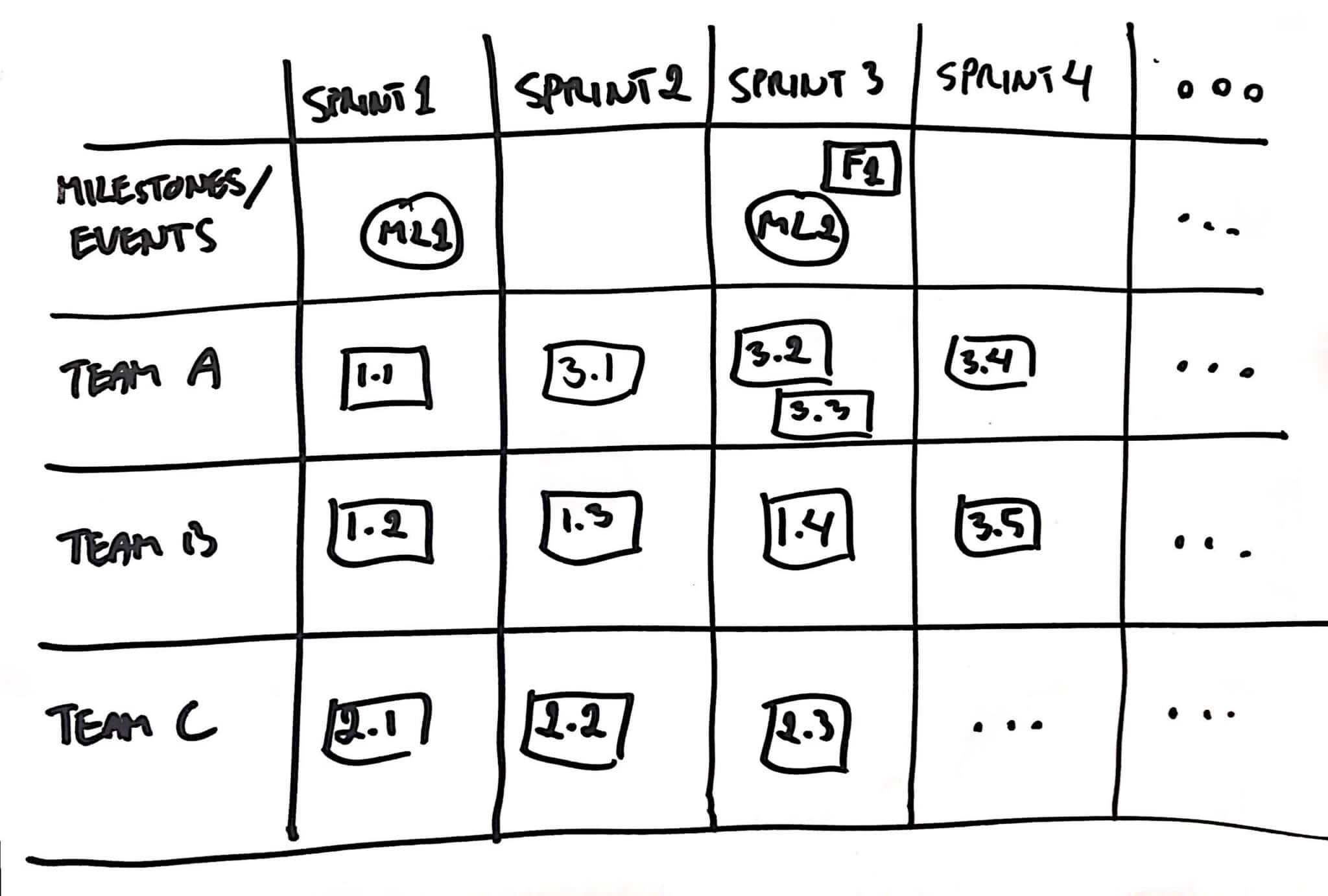

The Cross-team Features Board provides a visual summary of features and its User Stories, when they need to be worked on, and helps visualize any cross-team dependencies impacting their delivery. The board helps communicate and align the features delivery plan to the stakeholders.
Below is a visual representation for a sample Cross-team Features Board.
Should I use a Cross-team Features Board?
Only use the Cross-team Features Board if you have a cross-team situation that could not have been avoided. If possible, try to adjust your programe of work and your teams to completely remove or minimize cross-team dependencies.
The Cross-team Features Board is a useful artefact if you have cross-team dependencies, meaning, you do have a list of features to be worked on that depends on more than one team.
How to build a Cross-team Features Board?
Please find below a step-by-step for building a Cross-team Features Board.
Step 1 -Features and Milestones
First, make sure everyone understands how the features belong together. For example, below is a sample features sequencer. On it, everyone can see that the MVP consists of F1, f2, F3 and F4; the product increment consists of F5, F6, F7, F8 and F9.
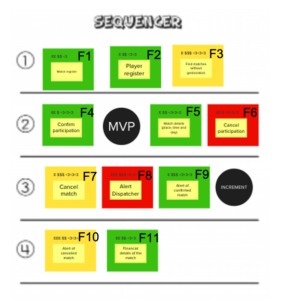
This artefact is generated by a Lean Inception workshop. If you do not have a Features sequencer, you need something that shows features and milestones. On the Lean Inception, the features are planned via MVP and product increment milestones.
Step 2 – Feature Steps Mapping
Fabio Aguiar on his Product Backlog Building book (available in Portuguese only – sorry, it’ll be translated to English soon) shares the activity Feature Steps Mapping.
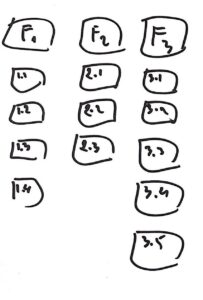
You can find more about it on this post. Basically, you have to breakdown each Feature in small steps, the User Stories.
The image below depicts the feature F1, which was broken down into four user stories: 1.1, 1.2, 1.3 and 1.4.
Step 3 – Features Mapping
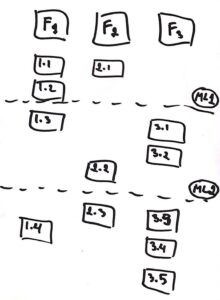
You don’t need to finish all user stories from Feature 1 to start on the User Stories from Feature 2. Typically, there are correlations and reasons for a group of user stories to be worked on at the same timeframe. These form the milestones. A few examples: “Payment Flow 1 UI complete”, “Ready for stress test”, “Security level 1 achieved – ready for testing internally”
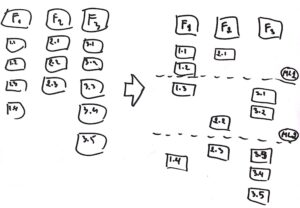
These milestones should mainly consider the user stories and the logical order in which they should be worked on and released. But, some considerations about who (or which team) is responsible for such user story might arise. If this is the case, take note on the user story itself. The next activity will make the cross-team division of work visible to everyone. While doing the next activity, these milestones should be revisited and adjusted.
Step 4 – Cross-team Features Board
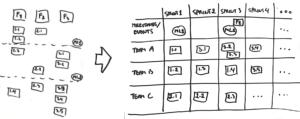
Please follow the following steps for creating the Cross-team Features Board.
- Create the Cross-team Features Board table:
– the time goes horizontally; columns Sprint 1, Sprint 2…
– the Row 1 indicates the milestones/ events (e.g. “Milestone X”, Feature Y completed”, “MVP ready”
– the following Rows are the team names (e.g team A, team B…) - Distribute the User Stories as per the Team-Sprint combination. Please respect the team capacity for a Sprint.
- Add arrows and colours to represent dependencies between user stories
- Describe the important milestones and events.